 Setup
Setup
Google Ads for a service business: end-to-end setup
In 98 days: a new website, Google Ads, call tracking, CRM attribution. 107 confirmed orders, 3.4× revenue-to-ad-spend — for a textile service business in 2 cities. Median sales cycle: 14 days (not the 4–8 weeks we expected).
🏪
3.4×
revenue to ad spend
3.4×
revenue to ad spend
107
orders in CRM
Who this is for
This case study is for you if...
🏪
Service business with a physical location
You run a physical showroom or shop and want to start online ads, but you don't have a website built for them
📞
Long sales cycle (2–4 weeks)
You sell a service with a 2–4 week sales cycle, where the customer calls or walks in first and pays later
📊
Most deals close offline
You're spending on ads but don't know how much actually lands in your CRM
🚧
No digital infrastructure
Call tracking isn't set up, or it's set up but doesn't pass sources back into your ad platform
See yourself in this? Keep reading: this case study shows the solution.
Context
About the project
Service business in the textile solutions niche (curtains, tulle, roller blinds)
Service business in the textile solutions niche (curtains, tulle, roller blinds) — 2 physical showrooms, a "measurement-to-installation" model
🔥
Challenge
The client came without any digital presence to support paid ads. There was an old brochure website that didn't convert. No CRM attribution, no call tracking, no offline conversions. A service model with a long sales cycle made measuring ROI impossible.
🎯
Goals
01
Build the digital infrastructure from scratch for Google Ads
02
Launch campaigns in 2 cities with separate strategies
03
Measure ad ROI transparently for the service model
04
Set up call tracking + offline conversions to optimize for real deals
Why this is hard
What can go wrong here
And why most contractors get it wrong
Service model ≠ e-commerce
In e-commerce a purchase is logged on the site automatically. In a service business the customer calls, comes in for measurement, thinks for a week, and only then pays. Standard tracking doesn't see this — Google Ads optimizes for clicks, not real sales.
How I solved it:
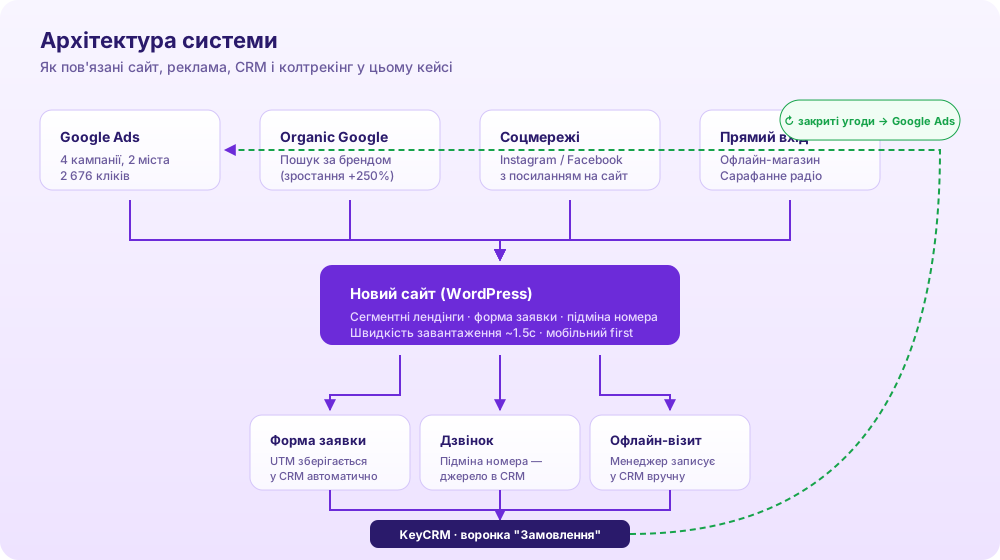
Ringostat call tracking + offline conversions from CRM → Google Ads. The 2–4 week window between lead and payment is accounted for in the conversion upload — the algorithm sees real deals.
2 cities = 2 different markets
A single campaign for two cities is a mistake. Customer behavior differs: in the larger city people look for premium and aesthetics, in the smaller one for price and speed. A shared campaign means a weak message for both.
How I solved it:
Separate campaigns for each city with distinct keyword sets and landing pages
Old site vs a new site built for ads
An old brochure site is good for brand, but not for Google Ads. No inquiry form, no UTM handling, no segmented landing pages, slow to load. Ads bring traffic but it doesn't convert.
How I solved it:
New website with a custom WordPress theme: segmented landings, intent routing, UTM persistence, Core Web Vitals optimization
CRM without discipline = illusion of data
Before the launch, managers filled in "deal amount" for 6% of cases. Revenue technically existed, but it couldn't be measured — which means it couldn't be optimized.
How I solved it:
A new CRM process: separate "Orders" pipeline, mandatory "amount" field, UTM persistence from lead to deal
Process
What was done
STEP 01
New website with intent routing
Replaced the old brochure site with a custom WordPress theme. One site with segmented landing pages for each campaign (instead of 2–3 separate sites). Intent routing via ACF.
STEP 02
Google Ads: 4 campaigns across 2 cities
4 search campaigns: Core+Systems Lviv, Core+Systems Khmelnytskyi, Brand UA, Lviv Maps Local. Different strategies for different markets — Lviv premium, Khmelnytskyi pragmatic.
STEP 03
Call tracking: every call has a source
Connected a number-substitution service (Ringostat). Now every call is logged in CRM automatically with: which ad brought the customer, which keyword they searched for, which city. No more "unknown source" calls.
STEP 04
Google Ads sees real sales, not clicks
Set up automated data push from CRM to Google Ads: when a deal closes, the ad platform learns which inquiry became a sale. The algorithm no longer optimizes for "many cheap clicks" — it searches for customers who actually buy.
STEP 05
A CRM where revenue is visible on every order
Added a mandatory "deal amount" field to the order card. Before, managers filled it in for just 6% of deals — now it's 100%. For the owner this means concrete monthly revenue is visible, not a list of closed leads without numbers.
My approach
What I did differently
1
Two cities, two strategies — not one
Customer behavior in the larger city differs from the smaller one: some look for aesthetics and premium, others for speed and price. That's why each city got a separate Google Ads campaign with its own keywords, ad copy, and landing page. A single "shared" campaign would have produced weak results for both.
2
Tie ads to real money, not clicks
Google Ads optimizes by default for what it "sees" — clicks and on-site forms. For a service business that's not enough: the customer calls, comes in for measurement, thinks for a week. We built full chaining: call → CRM → closed deal → signal back to Google Ads. The algorithm now looks for buyers, not clickers.
Results
Numbers that speak for themselves
3.4×
revenue to ad budget in 98 days
107
confirmed orders in CRM
14 days
median sales cycle (lead → deal)
Transformation
Before and after
Online inquiries
None — phone and walk-ins only
2,676 clicks → 107 orders
A new channel that didn't exist before
Sales source clarity
"Ads work somewhere, but it's unclear"
Concrete revenue per channel is visible
Budget can be planned on data
Measured revenue in CRM
6% of deals with amount — the rest didn't count
100% з сумою
In 98 days — UAH 2M in confirmed orders
Customer calls
Impossible to identify which ad drove the call
Every call tagged with campaign and keyword
We know which keyword triggered each call
Ad return
Unmeasurable
3.4 UAH per 1 UAH
Revenue-to-spend ratio over 98 days
Quarterly forecast
"We'll see how it goes"
Planning based on monthly reports
Budget adjusted from real data
What this means for the business
3.4×
revenue in CRM vs ad budget in 98 days (revenue-to-ad-spend, excluding cost of goods)
2M
UAH in confirmed CRM orders in 98 days
14 days
median cycle from lead to closed deal
"We need to move toward Google — that's what's actually delivering results for us. Numbers don't lie." And later: "Overall I like how we're moving — I understand everything takes time." — owner of the service business (2 cities, Ukraine), from chat messages February–March 2026. Shared with permission; identifying details removed.
Free resource
Checklist: how to launch Google Ads for a service business
Step-by-step infrastructure for a service model: site → ads → call tracking → offline conversions. Based on a real case with 3.4× revenue-to-spend.
- PDF, 3 pages — from site to offline conversions
- CRM field template for attribution
- No signup, no spam
PDF
End-to-End Service Setup Checklist
Questions
FAQ
How to measure Google Ads ROI for a service business?
You need a chain of four tools: Google Ads + a call tracking service (Ringostat, CallRail, CallTrackingMetrics) + CRM + an offline conversions mechanism. When a customer calls or submits a form, the system remembers which ad brought them in. When the deal closes in CRM, a signal is sent back to Google Ads. The algorithm starts optimizing for real sales, not clicks. In this case, revenue in CRM reached 3.4× the ad budget in 98 days.
How long does end-to-end digital setup for a service business take?
In 98 days (14 weeks) you can build the full infrastructure from scratch: new site, Google Ads campaigns, call tracking, offline conversions, CRM discipline. The first measurable ROI appears in month two, stable results in month three.
Do I need a separate landing page for Google Ads?
Paid ads need segmented landing pages for specific intents, with an inquiry form, UTM persistence, and load time under 2 seconds. Old corporate sites often lack all three. In this case, the new site lifted conversion and produced 107 orders in CRM.
Can I run Google Ads in multiple cities at the same time?
Yes, but with separate campaigns per city. Different cities = different customer behavior, different search queries, different CPC. In this case, two cities with distinct strategies produced a 9% CTR and allowed budget to be allocated to the more efficient market.
More case studies
Related projects


Ready for growth?
Let's discuss your project and find the solution that works for your business.